#  Discord Gemini Translator
English | Русский





A lightweight, privacy-focused browser extension for real-time two-way translation in Discord Web (https://discord.com/*) powered by the Google Gemini API.
---
## ✨ Features
- 🎙️ **Real-Time Voice Channel Subtitles (Live Captions)**:
- Direct low-latency WebRTC audio track interception for voice channel participants.
- Streaming speech recognition and translation powered by **Gemini Multimodal Live API** (WebSocket).
- Built-in local **VAD (Voice Activity Detection)**: filters background silence and transmits audio only when speech is detected, preserving Google AI Studio free tier quotas.
- Dedicated Live model selector (Flash/Live) in extension settings, independent of text chat models.
- Draggable, glassmorphic floating subtitles overlay with auto-fadeout of completed phrases after 7 seconds.
- Quick toggle button `[🎙️ Subtitles]` embedded in both the Discord voice status panel and input bar.
- 📥 **Translate Incoming Messages & Auto Language Detection**:
- Direct translation button on every message and quote/reply in the chat.
- **Auto Language Detection**: translation card dynamically shows the detected source language and translation direction (e.g., `⚡ Gemini (EN ➔ RU)` or `⚡ Gemini (JA ➔ RU)`).
- **Smart Native Language Skipping**: messages already written in your target language are skipped in auto-translate mode without burning API quotas or cluttering the channel.
- Clean inline translation bubble right below the original text, dismissable in one click.
- ⚡ **Channel Auto-Translate Mode**:
- Instant `[⚡ Auto]` toggle button embedded in the chat input bar for the current channel.
- Global auto-translate toggle available in extension settings.
- Smart queue with rate-limit protection (350 ms throttle) and automatic skipping of historical backlog.
- 📤 **Translate Outgoing Messages Before Sending**:
- Gemini translation button embedded beside the Discord input bar.
- Ergonomic shortcut: **`Ctrl + ~`** (Tilde / `ё`) instantly translates the typed text in the Discord Slate editor to the target language before sending.
- 🌐 **Quick Language Switcher in Chat Bar**:
- Distinct `[ EN ▾ ]` badge near the input bar opens a full popout menu with 9 supported languages without leaving Discord.
- 🔍 **Reverse Translation Preview (Self-Check)**:
- Verifies outgoing translations with a reverse preview box (`RU ➔ EN ➔ RU`) right above the chat bar before sending.
- Includes a one-click **"Revert"** button to restore your original typed text if the nuances don't match.
- Optimized structured prompt extracts both translations in a single API call (50% quota savings).
- 🎭 **Translation Tone & Style Customization**:
- Choose between **Gamer / Casual Slang**, **Neutral (Conversational)**, **Formal / Professional**, or **Concise (Fast Calls)**.
- ⚡ **Local LRU Translation Cache**:
- High-speed cache for up to 500 recent phrases stored in `chrome.storage.local`.
- Repeated phrases resolve in 0 ms with zero API quota consumption.
- 🧠 **Full Support for Modern Google Gemini Models**:
- Automatically fetches the list of available text models from your API key.
- Supports **Gemini 2.5 Flash**, **Gemini 2.5 Flash-Lite**, **Gemini 2.5 Pro**, and **Gemini 1.5 Flash/Pro**.
- **Hardware Reasoning Disabled (`thinkingBudget = 0`)**: 2.5 series models respond near-instantaneously (200–400 ms) without reasoning token latency or thoughts leaking into chat.
- 🛡️ **Discord Syntax Preservation**:
- Preserves Markdown formatting (`**bold**`, `*italic*`, `~~strikethrough~~`, `||spoiler||`, inline and multi-line code blocks ```` ``` ````).
- Preserves mentions (`<@id>`, `<#id>`, `<@&id>`), server custom emojis (`<:name:id>`), and URLs.
- 🎨 **Modern Acrylic Glass Interface**:
- Dark glassmorphic theme with soft neon gradients and Discord/Gemini aesthetic.
- Native bilingual UI with instant **`EN` / `RU`** switcher.
- 🔒 **Privacy & Security First**:
- Your API key is stored **strictly locally** in your browser (`chrome.storage.local`).
- Calls are made directly to Google's official Gemini endpoint (`generativelanguage.googleapis.com`) with zero third-party telemetry or middleware servers.
---
## 🚀 Installation
No build steps or dependencies required. Runs natively on pure JavaScript (Manifest V3):
1. **Download the repository**:
- Click the green **Code** button ➔ **Download ZIP** and extract it anywhere on your computer (or run `git clone https://github.com//discord-gemini-translator.git`).
2. **Open Extensions page**:
- In any Chromium browser (Google Chrome, Microsoft Edge, Brave, Opera, Vivaldi), navigate to:
```text
chrome://extensions
```
3. **Enable Developer Mode**:
- Toggle **Developer mode** in the top-right corner.
4. **Load the extension**:
- Click **Load unpacked** in the top-left corner.
- Select the `discord-gemini-translator` folder.
5. **Done!** The extension icon will appear in your browser toolbar.
---
## ⚙️ Setup
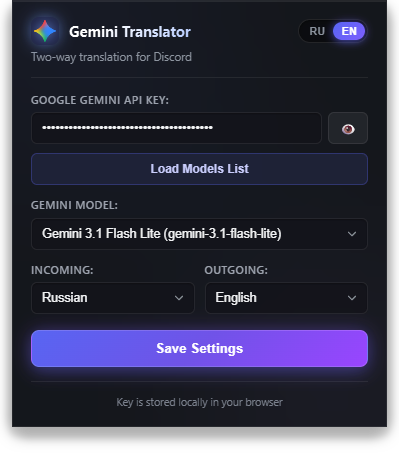
1. Get a free API key from [Google AI Studio](https://aistudio.google.com/app/apikey).
2. Click the **Gemini Translator** icon in your browser toolbar.
3. Paste your key into the **Google Gemini API Key** field.
4. Click **Load Models List** and pick your preferred model (recommended: **Gemini 2.5 Flash-Lite** or **Gemini 2.5 Flash**).
5. Choose your incoming and outgoing target languages.
6. Click **Save Settings**.
---
## ⌨️ Shortcuts
| Shortcut | Description |
| :--- | :--- |
| **`Ctrl + ~`** (or `Ctrl + ё`) | Translate text currently typed in the Discord chat box to the target outgoing language |
---
## 📁 Project Structure
```text
discord-gemini-translator/
├── manifest.json # Extension Manifest V3 configuration
├── GEMINI.md # Mandatory development rules & guidelines for AI agents
├── assets/ # Project screenshots and promotional artwork
│ └── settings.png # Extension settings interface preview
├── icons/ # Extension icons (16x16, 48x48, 128x128 px and source SVG)
├── popup/ # Extension settings modal
│ ├── popup.html # Acrylic markup with data-i18n attributes
│ ├── popup.css # Glassmorphic and neon aesthetic styles
│ └── popup.js # EN/RU i18n, model loader, storage sync
├── background/ # Service worker
│ └── background.js # REST v1beta + WebSocket Gemini Multimodal Live API
├── content/ # Discord DOM integration scripts
│ ├── content.js # Button injections, chat observer & captions overlay (ISOLATED)
│ ├── content.css # Scoped styles for Discord UI (.dgt-*)
│ └── inject.js # WebRTC audio capture, VAD, PCM 16kHz & Slate.js hooks (MAIN)
└── tests/ # Automated test suite (Native Node.js test runner)
├── i18n-no-hardcode.test.js # Audit preventing unlocalized UI text & dictionary leaks
├── live-captions.test.js # WebSocket Live API protocol & sentence aggregation
├── inject-audio.test.js # Audio downsampling to PCM 16kHz, VAD & Base64 encoding
├── background.test.js # Service worker, REST requests, LRU caching & errors
├── content.test.js # Chat integration, Slate editor replacement & selectors
└── popup.test.js # Settings validation & model filtering
```
---
## 🧪 Testing
The project has comprehensive automated test coverage built on the native Node.js test runner (`node:test` + `node:assert/strict`) with **zero third-party test dependencies**:
```bash
npm test
```
### Coverage across 88 tests:
- 🌐 **UI Localization & Anti-Hardcode (`i18n-no-hardcode.test.js`)**: ensures all HTML elements have `data-i18n` attributes, verifies 100% key parity between RU and EN, guarantees zero Cyrillic characters in English dictionaries, and statically audits JS files against raw string DOM assignments.
- 🎙️ **Streaming Live Captions (`live-captions.test.js`)**: validates WebSocket messages, modality configuration, thought part filtering (`thought: true`), and sentence completion upon `turnComplete`.
- 🔊 **Audio Capture & VAD (`inject-audio.test.js`)**: verifies WebRTC audio downsampling from 48 kHz to 16 kHz (16-bit mono PCM), RMS threshold calculations to cut silence, and Base64 chunking.
- ⚡ **Background Services & Cache (`background.test.js`)**: tests REST endpoints, `thinkingBudget: 0` enforcement, LRU translation cache eviction, and model list sanitization.
- 💬 **Discord Integration (`content.test.js`)**: verifies Slate.js editor text replacement without focus loss, channel auto-translation queues, and UI overlay containers.
- ⚙️ **Popup Window (`popup.test.js`)**: validates separation of text vs live models, options persistence, and storage synchronization.
---
## 📋 Development Guidelines
All developers and AI agents must follow the repository standards documented in [[GEMINI.md](GEMINI.md)]. It establishes strict rules against hardcoded strings, requires `dgt-*` scoped CSS, specifies Slate.js integration requirements, and provides a Definition of Done checklist.
---
## 📄 License
This project is licensed under the [MIT License](LICENSE).