The desktop companion for artists.
Native, open-source neural engine and floating companion toolbar for PhotoCraft. Direct in-place canvas execution over local JSON-RPC socket 18492 with DirectML GPU acceleration and zero Wasm sandbox limits.
01INTERACTIVE PLAYGROUND
See Companion in action.
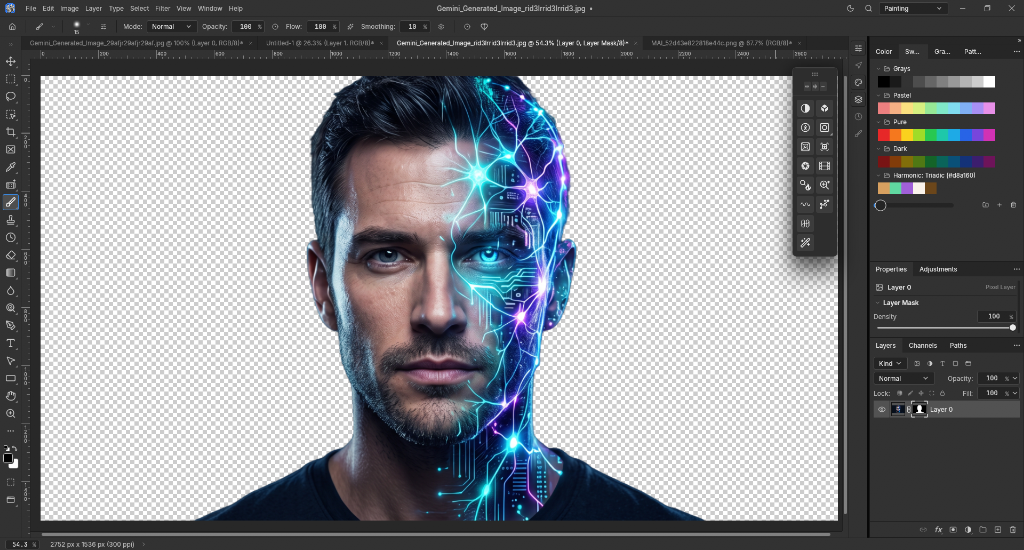
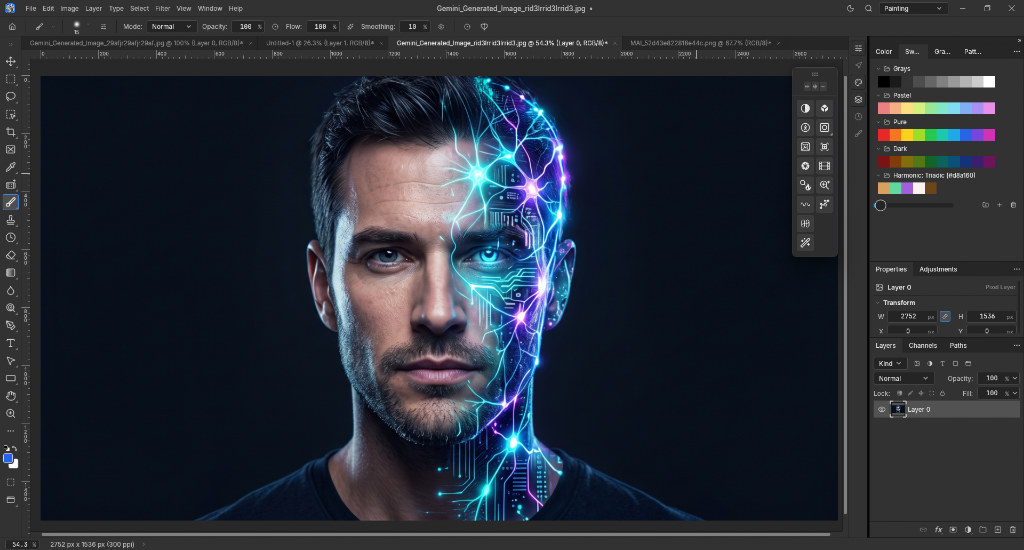
Experience in-place neural execution. Select a showcase scenario below, drag the comparison curtain, or click the Companion buttons to simulate live socket execution.
02COMPANION PLUGINS
14 plugins. One companion.
Native, open-source desktop plugins from the PhotoCraft ecosystem, built in Rust and free to use. Synchronized directly with the official plugin registry.
03LOCAL AI STUDIO
The precision that cloud AI cannot give.
Text prompts lack spatial control. Work directly on your layers in PhotoCraft with professional selection masks, and let local neural models execute seamlessly in place on your canvas.
AI Remove Background
High-fidelity subject cutout preserving hair and fine transparent details up to 8K. Sub-actions allow instant export to a new layer or a non-destructive layer mask in PhotoCraft.
AI Generative Fill (LaMa)
Context-aware object erasure via lasso selection and canvas border expansion without prompt hallucinations or cloud queues. Seamless texture synthesis in seconds.
Interactive Depth Studio
Monocular 3D depth estimation with click-to-focus lens bokeh defocus, aerial perspective, and atmospheric fog simulation calculated directly on your GPU.
Two-Tier Floating Toolstrip
Ultra-compact palette hovering over PhotoCraft. Toggle between horizontal (78px) and vertical (50px) layouts with screen coordinate memory and sub-action flyouts.
04WHY COMPANION
Built with an uncompromising philosophy.
PhotoCraft Companion is not an isolated sandbox or a subscription wrapper. It is a neutral, high-performance desktop runtime.
Zero Core Hardcoding
Anyone can drop a folder with an ONNX model and declarative plugin.json into plugins/ — and it works immediately without recompiling the program.
Direct Socket 18492 Bridge
Companion and PhotoCraft communicate over a local JSON-RPC socket. Read active layers, execute selection commands, and push masks in milliseconds.
100% Offline & Private
Zero cloud telemetry, zero external APIs. Neural models run directly on your hardware via DirectML and ONNX Runtime. Your art never leaves your machine.
Seamless In-Place Canvas Edit
Forget manual file saving or folder browsing. Click a toolstrip action, and the result commits directly into your active PhotoCraft layer stack.
Automatic CPU Fallback
Intelligent execution provider fallback. If DirectML GPU acceleration is unavailable, neural inference runs seamlessly on CPU threads.
Zero Subscriptions Forever
Free and open-source under the permissive MIT license. Built by creators for creators, with clean Rust architecture and community plugins.
05GET STARTED
Your studio. Your GPU. Your control.
PhotoCraft Companion runs locally as a native Windows/macOS/Linux utility. No accounts, no cloud tokens, no monthly subscriptions.
Launch PhotoCraft
Start PhotoCraft editor. The local IPC control socket opens on port 18492 automatically.
Start Companion
Run companion_app.exe. The floating toolstrip docks over your canvas and detects active layers.
Craft in Real-Time
Click any tool or AI action. Results commit directly to your layer stack with zero latency.